Last updated: October 13, 2026
Key Takeaways
- Indexing fails at a specific step, so fix discovery, crawling, or canonical issues rather than relying on one generic tactic.
- Test one URL in Bing Webmaster Tools, then compare it with the sitewide signals around it.
- The most useful reports separate sitewide failures from page-level problems.
- If a page is blocked, clear the block before requesting another crawl.
- What actually determines the right answer here?
- How do I use Bing Webmaster Tools to find the break?
- Which Bing reports tell you the most?
- If the page is blocked, what do I change first?
- What if Bing crawls it but still won’t index it?
- Edge cases: when the normal advice breaks down
- How do I know when the fix worked?
Quick Answer: in most cases, Bing Webmaster Tools can show you the likely indexing break within 5 to 15 minutes, but crawled pages may still take days to reappear in Bing results. If the issue affects live revenue or a migration, consult a qualified SEO professional or developer; for general indexing guidance, see Bing Webmaster Guidelines and Google Search Central.
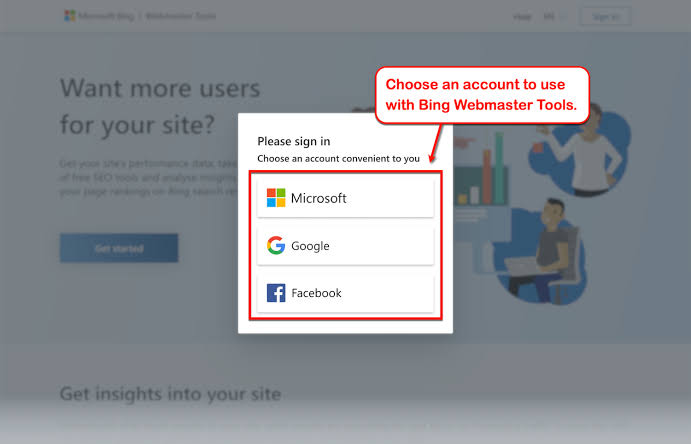
If your pages are not showing up in Bing, how to use Bing Webmaster Tools to diagnose indexing problems starts with the first place I would look, because it tells you where discovery stops: crawl, fetch, render, or indexing. If the problem is health-related for your site’s visibility and traffic, talk to a qualified SEO professional or developer about your specific setup, especially before you change a live site.
The goal here is not to “improve SEO” in the abstract. It is to figure out why a URL exists but does not appear in Bing’s index, or appears inconsistently, or is indexed without the version you expected. How to use Bing Webmaster Tools to diagnose indexing problems comes down to reading enough signals to isolate the break, but only if you read the reports in the right order. For Bing’s own documentation, start with URL Inspection.
What actually determines the right answer here?
The right answer depends on where the indexing chain breaks, not on one generic “submit and wait” fix. If Bing never discovered the URL, the problem is different from a URL Bing crawled but refused to index, and both are different from a URL Bing indexed but later dropped.
The fastest honest way to sort that out is to check the URL in this order:
- URL Inspection in Bing Webmaster Tools.
- Site Explorer or Search Performance to see whether Bing knows the URL at all.
- Crawl information and robots.txt access.
- Index Explorer or indexed URL reporting, if available in your interface.
- Server response and canonical signals outside Bing.
A generic article gets this wrong by jumping straight to “submit the sitemap.” A sitemap helps discovery, but it does not override a blocked robots rule, a noindex directive, a canonical mismatch, or a soft-404 pattern. Bing can also lag behind live site changes by days, so one fresh crawl snapshot is not proof of a permanent problem. For background on crawl and index behavior, see Google Search Central and Bing’s technical webmaster guidelines.
Use this simple table to pick the right path:
| Situation | Best Path | Why Other Options Fail |
|---|---|---|
| URL is new and not known to Bing | Submit URL, check sitemap inclusion, request crawl if available | Waiting alone is slow; robots fixes do nothing if Bing never found the page |
| URL is crawled but not indexed | Check canonical, noindex, content quality, duplicate signals | Sitemap submission does not force indexing |
| URL was indexed, then vanished | Check response code, canonical, redirects, and sitewide blocks | “Resubmit everything” misses the cause |
| Only some templates index | Compare page type, internal links, metadata, and rendering | Treating every URL the same hides pattern-level issues |
Quick check: if you do not know whether Bing is failing at discovery, crawl, or indexing, start with URL Inspection before changing anything.
How do I use Bing Webmaster Tools to find the break?
You use Bing Webmaster Tools by testing one URL at a time, then comparing that URL against the site-wide signals that surround it. If a single page fails, the issue is usually page-specific. If many pages fail together, the issue is usually structural: robots.txt, canonicals, templates, or server behavior.
Here is the workflow I would follow inside the tool:
- Open URL Inspection and paste the exact page URL, including the correct trailing slash if your site uses one.
- Read the status carefully: look for whether Bing has discovered, crawled, or indexed the URL, and whether it reports a block or alternate canonical.
- Check the crawl timestamp if Bing shows one. A crawl from 10 days ago can make a fixed page look broken when it is simply stale.
- Inspect robots.txt access in Bing Webmaster Tools or the crawl report. If Bing says it cannot access key paths, that is a site-level blocker.
- Review the canonical URL Bing selected. If Bing picked a different page than the one you want indexed, the duplicate set is part of the problem.
- Compare the page against its sitemap entry. A URL in a sitemap but blocked by noindex or robots is a contradiction, not a solution.
- Request indexing or crawl only after the page is technically eligible. Otherwise you are asking Bing to revisit a problem unchanged.
The details matter. If Bing says a page is crawled but not indexed, that is not the same as “Bing is broken.” It often means the page looks too similar to another page, is thin, is redirected, or has signals that point elsewhere. If Bing shows an HTTP 200 but the content is empty or swapped by JavaScript, the crawler may see a shell rather than the page you see in a browser.
One thing I would not do is treat the submit button as a cure. Bing Webmaster Tools can speed up discovery, but it cannot make a blocked page indexable. It is the flashlight, not the repair. For Bing’s process notes, see How to submit URLs to Bing; if the page is important or the setup is complex, consult a professional.
Quick check: if URL Inspection shows “discovered” or “crawled” but not “indexed,” your next step is usually canonical, content, or directive review, not more submissions.
Which Bing reports tell you the most?
The reports that matter most are the ones that separate site-wide failures from page-level failures. If you only have 15 minutes, check the URL Inspection view, crawl-related errors, sitemap status, and search performance for the missing URL cluster.
Bing Webmaster Tools is especially useful when several pages fail together. That usually means a template or server issue, not fifty separate page problems. For example, if a new /products/ directory is absent while the rest of the site is indexed, I would suspect one of three things: the directory is blocked in robots.txt, the pages canonicalize to another variant, or the internal linking is too weak for Bing to discover them quickly.
The same logic applies if you see indexation collapse after a migration. A 301 chain, wrong canonical tags, accidental noindex, or a staging rule pushed live can wipe out visibility across hundreds of URLs. If that happens on a live site, consult a migration specialist before changing more rules.
Use the reports as a triage stack:
- Search Performance: tells you whether Bing is showing the pages for any queries at all.
- URL Inspection: tells you what Bing thinks about a specific URL.
- Crawl Errors / Site Scan: exposes broken links, redirect issues, and server problems.
- Robots.txt Tester or robots diagnostics: shows whether major paths are blocked.
- Sitemaps: confirms whether Bing can read the URL list you gave it.
If you are dealing with a page that is technically indexable but still missing, the diagnosis often comes down to comparison. Look at one indexed page and one missing page side by side. Compare title tag length, canonical tag, meta robots, internal links, response code, and rendering output. Bing rarely needs a mystery novel; it needs a diff.
Quick check: if the problem affects a folder, a template, or a migration date rather than a single URL, spend your time in crawl and sitemap reports before you touch individual pages.
If the page is blocked, what do I change first?
If the page is blocked, fix the block before you ask Bing to crawl again. That means you check robots.txt, meta robots, HTTP headers, redirect chains, and canonical tags in that order, because one of them may be telling Bing not to index the page even when the page loads fine in a browser.
Here is the sequence I would use:
- Open the live URL in a browser and confirm the final destination. A page that redirects three times is already a clue.
- Check the response code. A real page should not be returning a 3xx chain, a 4xx error, or a soft-404 pattern dressed up as a 200.
- Inspect robots.txt for the folder or parameter pattern. A single disallow rule can hide an entire section.
- Look for meta robots or x-robots-tag noindex. Either one can keep Bing from indexing the page even when crawl succeeds.
- Review the canonical tag. If the canonical points to a different URL, Bing may honor that signal instead of your preferred page.
- Check the sitemap entry. The URL should match the live, indexable version, not an outdated or redirected one.
- Fix one blocker at a time and then request a recrawl so you can see which change mattered.
A common mistake is to remove noindex but leave a self-defeating canonical in place. Another is to open robots.txt for the entire site when only one directory was blocked. I would rather make one precise edit and then watch Bing’s next crawl than make five broad edits and lose the trail.
There is also a limit here: not every blocked page should be indexed. Some duplicate print views, filtered parameters, login walls, and internal search results are better left out of the index. Bing refusing those pages is often correct.
Quick check: if the page is blocked by directive, header, canonical, or robots rules, fix that first; if the page is supposed to stay out of search, do not force it in.
What if Bing crawls it but still won’t index it?
If Bing crawls a page but still will not index it, the problem is usually quality, duplication, or canonical selection rather than access. That is the point where many generic guides run out of useful advice and start repeating “publish better content,” which is too vague to help.
In Bing Webmaster Tools, look for signs that the page is being treated as a duplicate, thin page, or alternate version. Then compare the page to the version Bing prefers. Sometimes the issue is obvious: the title is nearly identical to ten other pages, the body is sparse, or the page is mostly boilerplate. Sometimes the issue is structural: all the content lives behind JavaScript that Bing renders inconsistently, or the page is too close to another URL with the same intent. For more on canonical and duplicate handling, see Bing on canonicalization and Google Search Central.
A practical way to diagnose this is to split the problem into three questions:
- Can Bing fetch the full content? If not, rendering or access is the issue.
- Does Bing prefer a different canonical? If yes, duplicate signals are in play.
- Does the page earn a unique index spot? If not, the page may be too redundant or too weak relative to other pages on the site.
That does not mean every page needs long-form copy. It means the page needs a clear reason to exist as its own indexed URL. A 200-word product variant page that differs only by color can be a poor indexing candidate. So can a city page that just swaps place names.
When the advice is “improve the page,” I would interpret that as tighten the purpose, reduce duplication, strengthen internal links, and make the page obviously distinct from near-neighbors. If Bing indexes the template but not the variants, the variants may not be pulling enough weight on their own.
Quick check: if Bing can crawl the URL but prefers another canonical or still omits the page, you are dealing with duplication or page-value issues, not discovery. When in doubt, consult a professional.
Edge cases: when the normal advice breaks down
If your site fits one of these cases, standard indexing advice often gives the wrong fix. The change in path matters more than the checklist.
-
JavaScript-heavy site
- What changes: Bing may see a shell before the final content, especially if rendering is delayed or content loads after interaction.
- What to do instead: Compare the rendered output Bing sees with the source HTML and the browser-rendered page. Make sure key content, title, and canonical signals are present without waiting for user interaction.
-
Large ecommerce filters
- What changes: Faceted URLs create thousands of near-duplicates.
- What to do instead: Decide which combinations deserve indexing, then block or canonicalize the rest. Bing Webmaster Tools helps you find the patterns, but the fix is site architecture, not repeated submission.
-
Site migration or redesign
- What changes: Indexing failures often come from redirects, canonicals, and robots rules introduced during launch week.
- What to do instead: Audit the old-to-new URL map, confirm 301s go to the closest equivalent, and check that no staging directives were shipped live. A single misplaced
noindexcan affect an entire section.
-
Local or multi-location pages
- What changes: Similar templates across many locations can look duplicate to Bing.
- What to do instead: Strengthen the unique signals on each page: address, service details, local proof, and internal links from relevant city or service hubs.
-
Content that changed very recently
- What changes: Bing may still be looking at a previous crawl snapshot.
- What to do instead: Wait for the next crawl cycle after fixing the issue, then recheck URL Inspection before making another change. Chasing a stale report can create a second problem.
Quick check: if your site relies on JavaScript, faceted URLs, migrations, or templated location pages, treat indexing as an architecture problem first.
How do I know when the fix worked?
The fix worked when Bing shows the page as crawlable, canonicalized correctly, and eligible for indexing, and when that status holds across more than one check. One green light after a single request is encouraging, but I would want to see the same result after Bing recrawls the URL and the page appears in Search Performance or indexed URL reporting.
Use a simple verification loop:
- Confirm the live page returns the right status code and content.
- Recheck URL Inspection in Bing Webmaster Tools.
- Confirm the sitemap still includes only the indexable URL.
- Check that the canonical tag has not changed unexpectedly.
- Look for the URL or query in Search Performance over the next crawl cycle.
A page can still lag in visibility even after the technical issue is fixed. That is normal. What matters is whether Bing can now crawl and choose the page properly. If the URL remains absent after technical cleanup, go back to duplicates, internal linking, and content distinctiveness rather than assuming Bing ignored the change.
Drafted with AI; not yet reviewed by a person.